Parksville / Qualicum Beach's only Apple Certified Macintosh Technician (ACMT) and Apple Support Professional, Dan LaRocque, posts semi-regular tips and blogs about his day-to-day experiences with Macintosh computer technology, social media, web marketing & design and other technology related developments.
Some Pretty Big News From Up Your Media –
New partner, new workshops, operating systems explained
Welcome Rob Van De Weghe
After 12+ years as a strictly solo operator, I’ve partnered with someone who can add value to the team, in a very specialized field.
Introducing Robert Van De Weghe, a newcomer to the Island, but someone I’ve known personally for over 20 years, and who was, in fact, my original inspiration for entering the Apple repair technician industry in the first place. He used to repair my Mac computers in the 90s and early 2000s until I grew tired of travelling to Vancouver for computer service, and took the training in 2008.
 He comes with a ton of experience in high level technical computer repair. He’s been an Apple Certified Mac Technician since 1998, with an expertise in Apple help desk and support for hardware, OS and software. He spent the last 13 years as IT manager for Rethink, Western Canada’s most creative advertising agency.
Rob is going to take on much of the hardware repair and in-home troubleshooting and training services I’ve always offered. He also has an expertise in smart home setup, home automation, and wireless networking for larger homes, so you should consider us for those services too. Having someone else trustworthy on board will allow us to extend our hours, extend our geographcal range and availability, and increase our range of services.
More Workshops for the New Year
Meanwhile, here’s a quick look at our workshop schedule for the coming new year. All classes will take place at the McMillan Arts Centre in Parksville, with the option to Zoom in. If there’s one thing I’ve learned in the past 21 months, it’s just how reliant we all are on our technology for just about everything. Digital literacy, and being able to roll with the constant changes coming down the technology pike, is crucial for all of us.
February 17th 3:30-5pm – Intro To Mac Level II
March 3 3:30-5pm – iCloud for iPads and iPhones
March 17 6:30-8pm – Social Media for Parents of Teens
March 31 3:30-5pm – Intro To Mac Level I
April 21 3:30-5pm – Intro To Mac Level II
May 5 6:30-8pm – Using the Photos App
What is an Operating System, and which one should my computer be running?
The Operating System, or OSX, is the primary software that powers your Mac computer. Apple generally releases a new operating system every year in the fall. Your computer is limited by its age as to which Operating System it can run. In general, if your computer was built anytime after 2015, you can run the most current operating system, Monterey, but that doesn’t mean your older computer doesn’t still have plenty of life.
2010 – If your computer was built before late 2009 , you can’t upgrade any higher than El Capitan 10.11. Computers running El Capitan have recently become more or less useless on the modern intent because of certificate and security issues. You can still check email and run your applications, but many websites have become unavailable to your browser. Apparently there is a workaround for this issue, but it might not be worth it for most users.
Late 2009 to 2012 – These computers can run High Sierra 10.13. High Sierra is still able to power through the modern internet, for the time being. Note, all my home computers are running High Sierra.
2013 – These computers can run Catalina 10.15. This is the oldest operating system that still receives security and other updates. 2014 computers can run Big Sur, OSX 11, and note, upgrading to Big Sur changes the entire file structure of your computer from the previous HFS+ to APFS, and can often cause performance problems and can require more preparation than normal. Most computers built post-2015 can run the most recent OSX Monterey, released just a month ago.
Here’s a good list and description of all Apple Operating Systems going back to 2001 here.
The definitive list as to your computer’s maximum operating system is available here.
Internet Speed Test
 Interested in knowing how fast your interrnet is? Go to Speedtest.net and find out. Your speed is determined by your account with Shaw or Telus and the infrastructure hardware available in your area. Measurements are in megabytes per second. For reference, I just switched to Telus to take advantage of their 900 megabytes per second fibre-optic special, In reality, I’m getting less than that. If your internet speed is causing you grief, it might be time to make a call to your provider.
Support Local This Christmas
 He won’t say it because he’s a humble guy, and praise isn’t why he did it, but Kevin Kinnear from Parks West donated 5% of his October sales to Forward House, to the tune of more than $7000. He also singlehandedly sponsors more minor hockey and baseball teams than Amazon ever has. So when you’re thinking about Christmas gifts and stocking stuffers, photo printing and office supplies, save the drive and the money and head to Parks West at 114 Hirst Ave. Let’s shop local this Christmas
He also has an impeccable sense of style.
That’s all for now. Many thanks for your continued support and trust. If you have time, please add a Google review of our services. Reviews help us build our business and improve our service.
Our First Up Your Media Newsletter since March 3, 2020!
This is our first newsletter since last March 3rd 2020. At the time, I was hyping our upcoming workshop schedule for March, April and May. Little did we know…
It’s been a very busy year for me, since computer services were declared essential right away, and all of a sudden everybody needed their technology working in tip-top shape. I’ve been doing repairs, upgrades, and onsite Apple training and troubleshooting since the beginning of the pandemic, and will continue to do so, using proper mask and sanitizing protocols. I’ve been diligent in my precautions, since many of my house-call clients are in their 70s, 80s and even 90s. I’m doing everything I can, at work and in my private life, to keep those clients safe.
PQBeat Digital Literacy Podcast
I was proud to appear on a recent edition of the PQBeat Podcast from PQBNews, speaking on digital literacy and internet security. We talked about how to spot online scams, effective password management, and how to protect yourself from Malware and phishing scams. You can visit and listen to the podcast here.
Passwords Passwords Passwords
From what I’ve observed, passwords continue to be the biggest hurdle for people in their day to day computer lives. I can’t stress it enough, and I’ve literally been saying it for over 10 years now, your best practice is to record your passwords on paper and keep that paper somewhere safe and handy. Paper and pencil are still the easiest, most reliable technologies for reliable password management.
Yes, there are many good password manager applications out there, including Last Pass, 1Password, and iCloud Keychain, but for many of my clients, setting up and maintaining a password manager is as much, or even more trouble, as manually managing their passwords.
Here’s the simplest technique I can suggest for creating decent passwords. Remember that the longer a password is, the harder it is to hack. I find most people use one or two base passwords, and then use variations of it on all their services. This is not the worst idea, as we must balance security with usability. But, to be able to follow the security recommendations of having one unique password per account, consider using that base password string, and then adding the name of the service you’re signing into.
For instance, let’s say Bubbles is your dog’s name, and it’s what you use for most of your passwords (don’t laugh). Using a password strength checker, we find that bubbles or Bubbles1 would be cracked by a robot immediately. Bubblesdog would take 6 months, and Bubblesdog1 would take 200 years. So, using the above solution, you would set Bubblesdog1apple for your Apple ID password, Bubblesdog1gmail for your Gmail password, and Bubblesdog1facebook for your Facebook password. It’s just a suggestion, but whatever system you settle on, stick with it, and write those passwords down!
McMillan Arts Centre’s New Creative Lab
We’ve been working with our friends at the McMillan Arts Centre on their new digital workshop studio. Thanks to some new Arts funding, they were able to upgrade their technology to include new computers, cameras and TVs to enable their Arts workshops to continue, by using Zoom. It’s a very sweet setup, and we’re looking forward to running some of our own technology workshops in a hybrid Zoom and in-person format in the very near future. Keep checking our email newsletters for details.
Got Zoom?
Take a quick Zoom survey. We’re trying to gauge the interest in running Zoom tech workshops, both through the MAC, through the PQMUG, and independently as Up Your Media. The Mac Users Groups hasn’t been able to meet since last February, and I know there’s been a real lack in technology learning opportunities over the last year. As I said at the top, we’re relying on computers and technology even more than ever, for shopping, communication, games, business meetings etc. How have you adjusted to the new landscape?
Shaw Mail Capacity Issues
Anyone who’s used Shaw email for any length of time has seen the warning email in their inbox that their email capacity has been reached. For whatever reason, Shaw hasn’t upgraded their customer’s email capacity since the 1990s. You max out at 1 GB of space, and once you’ve reached that limit, you will no longer be able to send or receive email. For context, Gmail offers 10 GB and Telus is offering 15 GB.
I find that often it’s the Sent mailbox that is storing all your archived emails, since most people regularly monitor and maintain their inbox, but rarely cull their Sent emails. Try that, if you’re approaching capacity, and don’t forget to delete your email trash.
Donate Your Old Macs
 I’m still accepting your older Mac products to use and refurbish for charity. It’s evident, now more than ever, that absolutely everyone needs access to computer technology for schooling, working, shopping and staying in contact with friends and family. Since last year, I’ve been able to donate a number of refurbished computers and iPads to people who had no computers at all, and sell other more modern machines to donate the money to charity. I was able to drop off $720 to the SOS Christmas fund, and some more to local anti-child poverty initiatives. I’m also open to buying your unused machines as well refurbish and redistribute, to keep them out of the landfill and ensure they’re being used by someone who needs them.
Things you can do Right Now to ensure better security on your Mac.
1 .Turn off login items in Users and Groups System Preferences – Login items are pieces of software that launch every time you turn on your computer. Sometimes expired or corrupt pieces of software are listed here, slowing down or exposing your computer.
2. Turn off Filevault in Security System Preferences – Filevault is an extra layer of security that most of us don’t need on our machines, and can slow your machine down, and potential render it irretrievable if you lose or forget your password.
3. Turn on Firewall in Security System Preferences – Your firewall will help keep unwanted connections away from your machine.
 4. Check Extensions in Safari Preferences – Some types of malware will install extensions into Safari, like search preferences and corrupt toolbars. Remove anything you don’t remember installing.
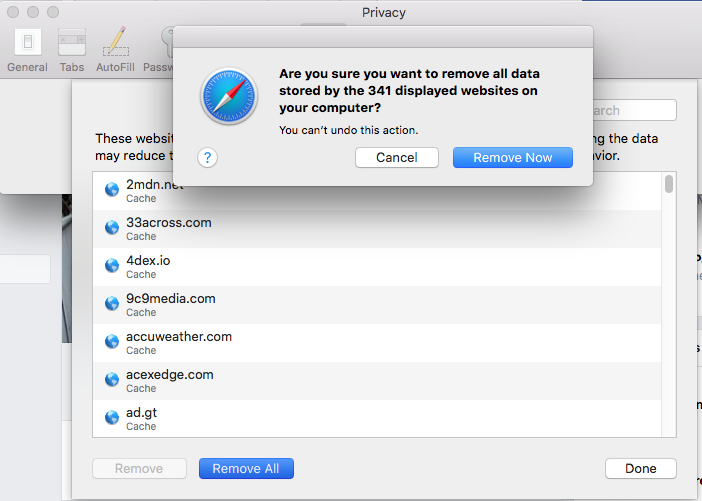
5. Clear Cookies in Safari Preferences – Some say daily, some say less often, but you should delete your cookies periodically.
6. Do a malware scan with Malwarebytes free software – Malwarebytes is the only software I use to clear malware from clients’ computers
7. Check that there are no proxy options in your Network settings – This is a recent one I’ve seen that can affect internet connectivity.
8. Create better passwords and record them somewhere handy – Some people like password managers like OnePassword and Last Pass. I say paper and pen are also a technology, and there’s less of a learning curve.
9. Create a redundant Time Machine backup and store it in a fire-safe box – Your data is the only thing that matters on your computer, 1 TB hard drives can be as cheap as $75. each, data retrieval starts at $1000.
10. Change your default browser to Firefox and search engine to Duck Duck Go – If your privacy means anything to you, try using more privacy oriented resources.
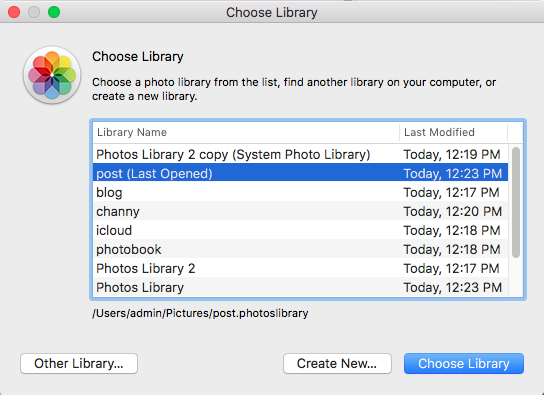 I’m regularly seeing Photos libraries of 10,000, 20,000, even up to 55,000 images (current record)! There’s nothing wrong with that, though it can cause an organizational nightmare, and also bog down the computer due to the large number of image thumbnails it must load. You can create and use multiple smaller Photos libraries, organized by year or by topic of your choice. To do so, launch Photos while holding down the Option key, you’ll be given a dialogue to either choose one of your existing libraries, or create a new one. Give it a name, import photos, and use it as normal. To switch back and forth from one library to another, you can either Option boot into the Photos program, or simply double-click on the Photos Library name in your Finder.
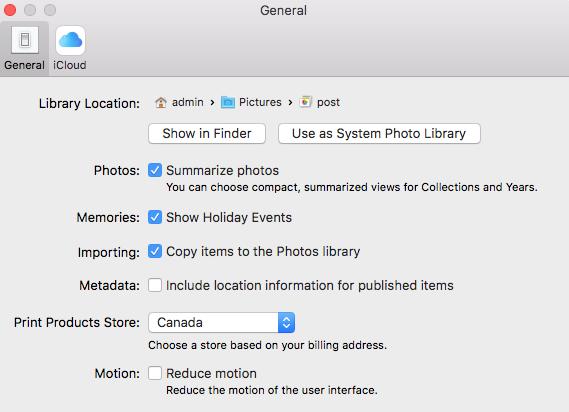 Another benefit to this, is you can create and designate a particular library as your iCloud System Photo library, the one that will sync and store your pictures in the Cloud, taking advantage of the convenience of the iCloud syncing feature without storing each and every photo you possess on the Cloud. Simply designate that library as your System Photo Library in your Photots Preferences, and if you want to use iCloud to sync those photos between devices turn the feature on in your iCloud settings.
I read a lot of articles on my phone that I follow off social media. Much of it can be described as ‘clickbait’, full of ads and extra pages, though the content might have entertainment or educational value. Reader View is the answer. Click the icon in the top left of the address bar to strip the ads and links and get straight to the content.



Finally finished the resource file from a presentation I did for the PQMug last April 2017. Self-Care For Your Mac computer, in movie format. Steps you can take to troubleshoot and maintain your iMac or MacBook before calling a technician.
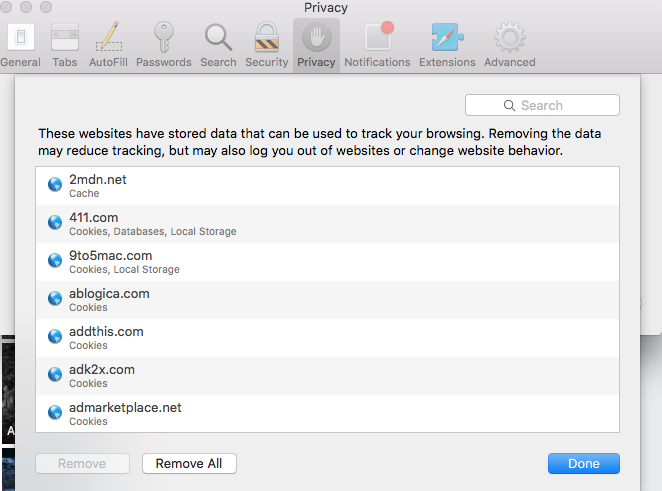 It was a good meeting last night of the MUG, 2 hours of steady discussion about DIY care and maintenance of your Mac computer. One thing we had to rush at the end was how to clear your browser cookies and caches. So for Jornn, who was asking, In Safari, navigate to the Preferences in the Safari menu and choose the Privacy tab. Select Manage Website Data and then choose to remove all data. This will clear all cookies and browser cache files off your computer, for security and performance.
There are 4 main components to your computer that dictate performance and can periodically require maintenance
- Hard Drive – The hard drive is where your personal data, plus OS and other software, is stored. Most drives are mechanical (HDD) but more modern drives are Solid State (SSD). HDDs are more likely to fail than SSDs but both can experience corruptions due to volume count and directory errors. A disk repair generally costs about $100 while a disk replacement runs from $250-$300. Don’t forget to buy an external hard drive as a Tme Machine backup.
- RAM – or Random Access Memory is independent of the hard drive, and is available, generally, to the software and applications as the computer is operating. The more you have, the faster your computer will run. To determine how much you have, look in the About This Mac dialogue in your Apple menu.
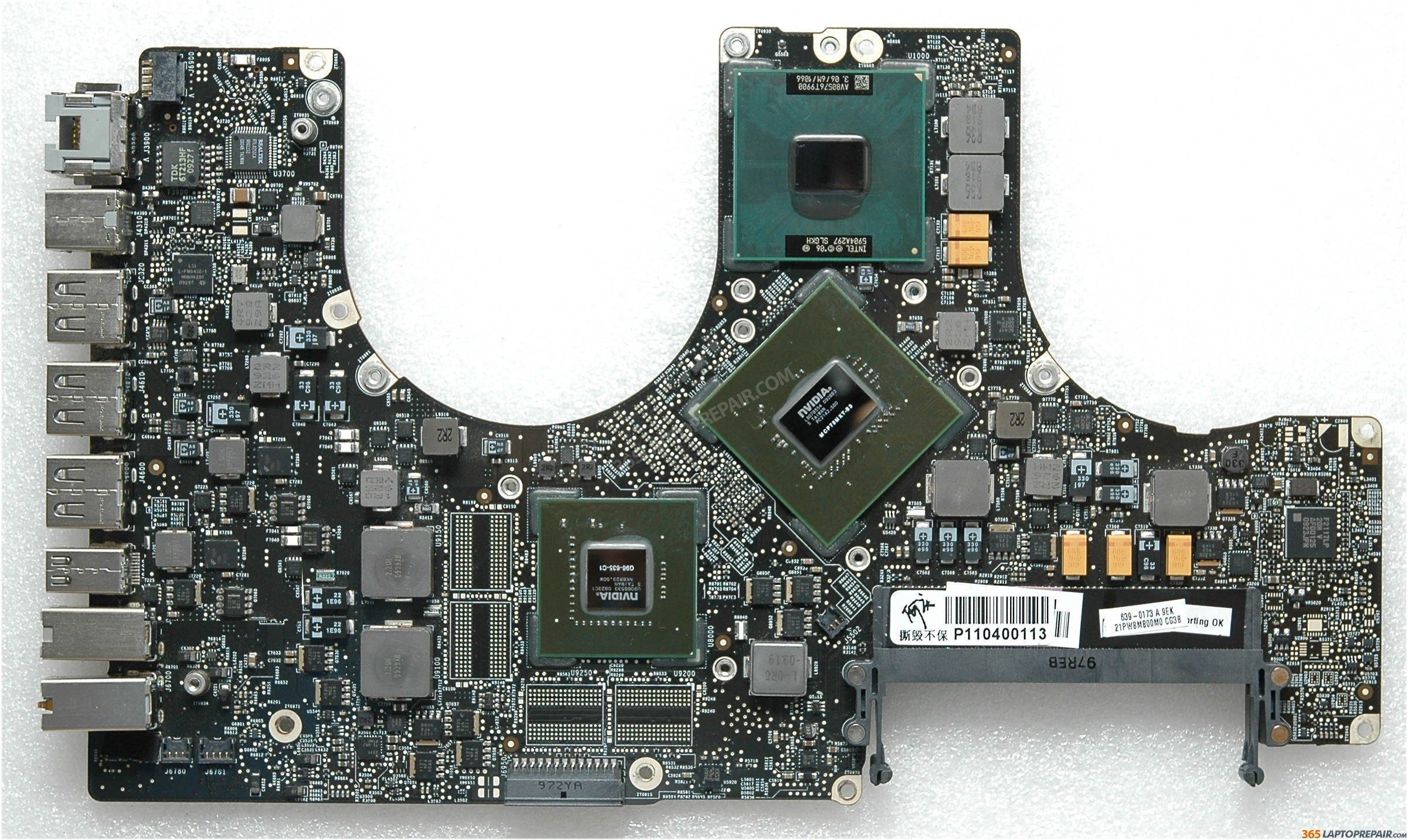 Logic board – This contains the CPU and the GPU (graphics processing unit). Sometimes the graphics processor will fail due to too much heat or other factors. Often this can be replaced or repaired, usually at a cost of $300-$500. IF YOU SPILL WATER, WINE, COFFEE, OR ANY OTHER LIQUID IN YOUR COMPUTER, it can “possibly” be fixed depending on the amount and location of the corrosion and electrical shorting the liquid caused. It WILL be expensive, between $300-$500. The alternative to repairing either of these situations is to replace the logic board altogether, usually around $800-$1000.
- Software – I like to say that over the past 10-20 years, the hardware in your personal computer hasn’t changed that dramatically. However, the software that runs that hardware changes constantly. I regularly see operating systems from 2007 (Snow Leopard 10.6.8) and every variation in between, while the current one today is Sierra (10.12.3). In addition, the other native softwares in your machine, ie., Safari, iTunes, Photos, etc need regular updates, as do third party applications like Microsoft Word, Flash, and Java. Not every operating system is appropriate for every vintage of computer, even if it’s compatible according to Apple.
Memory vs Storage.
It’s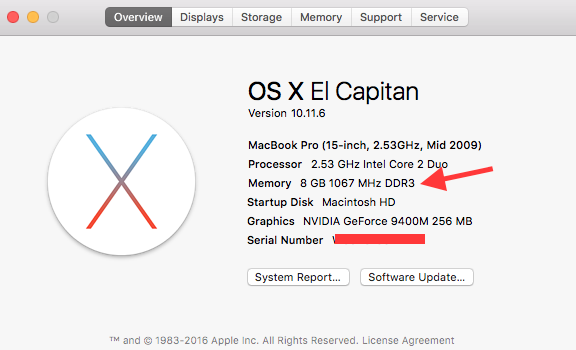 important to know the difference between memory and storage capacity on your computer. RAM, or system memory, is used for temporary processing storage, and contributes to the speed of your computer.
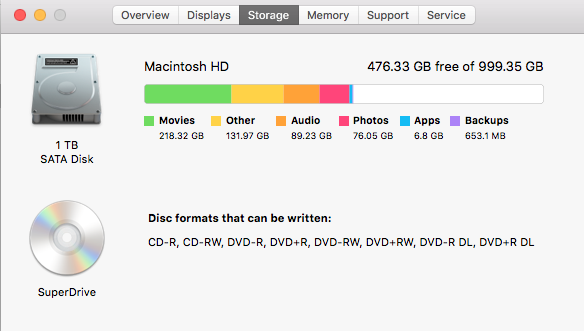
Storage is the overall capacity of your hard drive, i.e., how manysongs, pictures and documents you can keep on your drive. Most iMacs contain 1 TB of capacity. Newer MacBook Airs and Pros tend to use Solid State (SSD) drives, with faster speed and less capacity, although the capacity vs cost is getting better. If your startup disk should become too full, performance will be negatively affected.
You can check both these specifications on your machine by going to the About This Mac dialogue via your Apple menu at the very top left of your screen. Click on Storage to see what is taking up the bulk of the capacity of your machine.
 Both these components can generally be upgraded. It’s best practice to have the most RAM possible in your computer to maximize performance. To find out the maximum RAM for your model, check out this webpage. Hard drives can also be upgraded with either mechanical HDDs (low cost, high capacity, slower speed) or SSDs (high cost, low capacity, higher speed). Call 250-240-3564 to inquire about details and costs on your memory and hard drive upgrades.
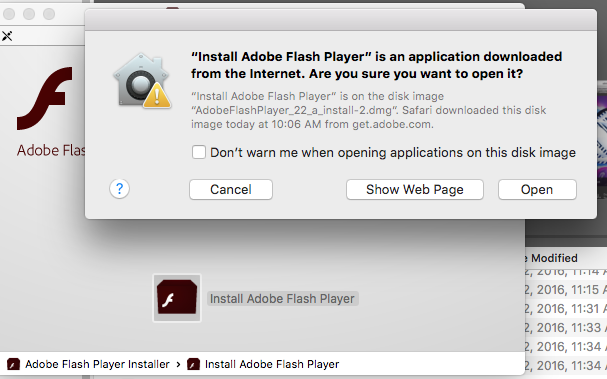
Adob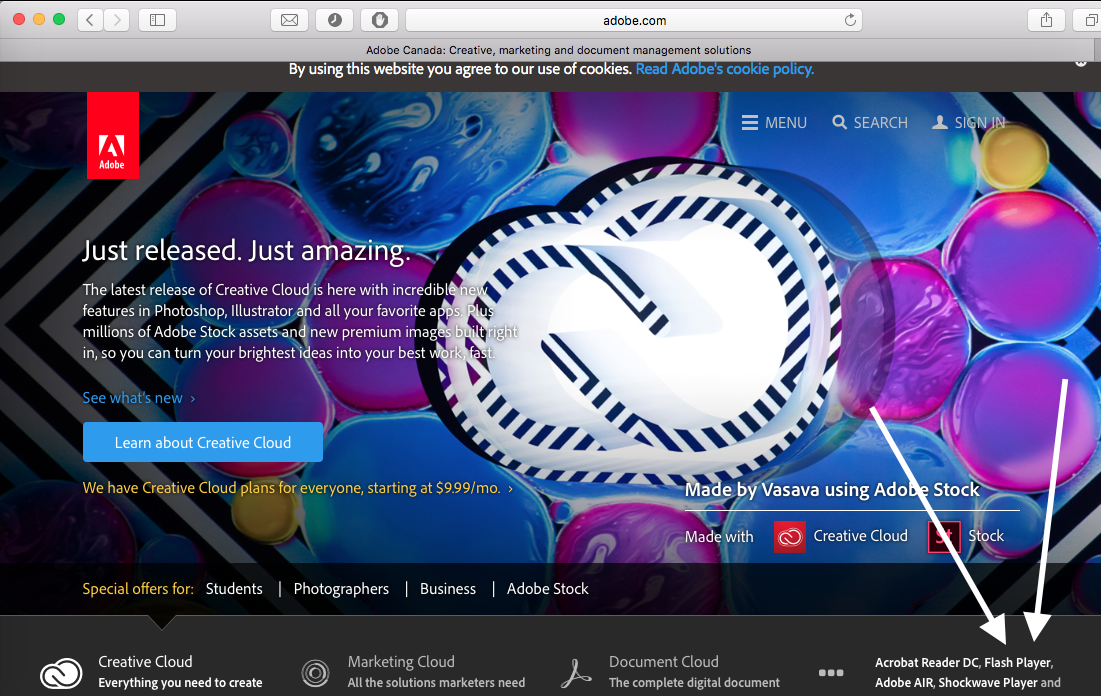 e Flash received an update on April 21st 2016, and it’s starting to affect usability. I had written a tutorial on how to upgrade your version a couple years ago, but here is some more current information.
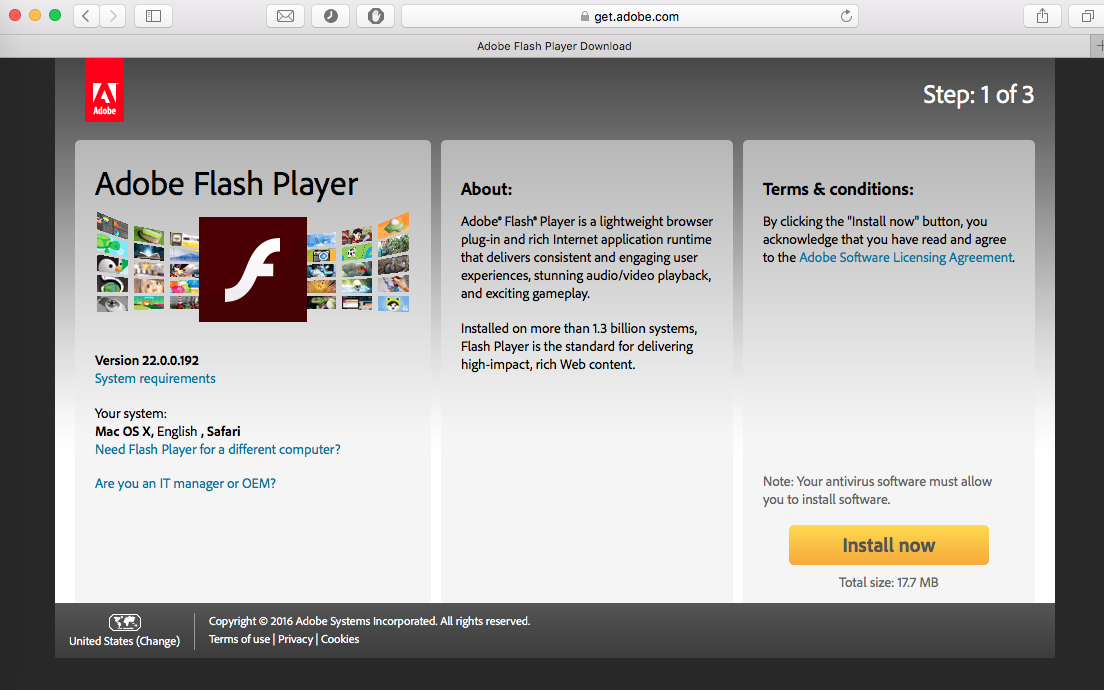 To avoid following a link to a bogus download, I advise going directly to Adobe.com, then following the link to the Adobe Flash download. From there, you have to follow ALL the steps to download, launch and install the update (many people tend to simply click the ‘install now’ link and assume they’re done). The software will appear in your downloads folder, double click on the ‘.dmg’ file (it’s a disk mounted image) and launch the installer, then double click the ‘install flash player’ button, then agree to open the software. You’ll have to sign in with your computer login password to authenticate, then continue to follow the installation process. To complete it, you’ll have to relaunch your browser(s). Once done, you can continue to watch Youtube videos, view JacquieLawson e-cards, reserve ferries, etc.